September 16, 2026
 Healthcare practice leaders do not need to understand every technical detail of their IT environment. They do, however, need enough visibility to know whether technology is reliable, secure, properly maintained, and supporting the practice effectively.
A practical IT scorecard should track 10 numbers: support ticket volume, response time, resolution time, recurring issues, system availability, backup success rate, recovery testing, security patch compliance, device lifecycle status, and cybersecurity events. These metrics give leadership a clearer picture of whether IT is improving operations or simply reacting to problems.
The goal is not to collect dozens of technical statistics. It is to identify a small number of measurements that help leadership answer a more important question:
Is our technology becoming more reliable, secure, and predictable over time?
Why Healthcare Practice Leaders Should Track IT Metrics
Many healthcare practices evaluate IT primarily through employee feedback.
If nobody is complaining, technology must be working.
If support tickets increase, something must be wrong.
Those observations can be useful, but they do not provide the complete picture.
A practice could have very few support requests while computers are becoming outdated, backups are failing, or security updates are falling behind. Another practice could experience an increase in tickets simply because it hired more employees.
IT metrics provide context.
Practice leadership should review trends over time, rather than focusing only on whether an individual number looks good or bad during a particular month.
Here are 10 useful measurements to include.
1. Support Ticket Volume
Track how many support requests employees submit each month.
Ticket volume helps show how frequently employees need assistance and whether that demand is changing.
For example:
- 35 tickets in January
- 42 tickets in February
- 67 tickets in March
The increase does not automatically mean IT performance is getting worse. The practice may have added employees, deployed new software, or completed a major technology change.
The important question is why the number changed.
It can also be useful to look at ticket volume relative to practice size. A growing practice should expect some increase in support demand as employees and devices are added.
2. Average Support Response Time
Response time measures how quickly the IT provider acknowledges and begins addressing a support request.
Leadership should understand the difference between response time and resolution time.
If an employee reports that a computer will not start and receives a response within 10 minutes, the response time is 10 minutes even if resolving the problem takes longer.
Rather than focusing solely on an overall average, practices should confirm that critical problems receive faster attention than routine requests.
A password question and a practice-wide network outage should not have the same response priority.
Response expectations should be clearly defined in the managed IT agreement.
3. Average Resolution Time
Resolution time measures how long it takes to resolve support issues.
This metric can reveal whether problems are being addressed efficiently or remain open for extended periods.
However, averages need context.
A simple password or printer issue might be resolved quickly, while a problem involving an EHR vendor, internet provider, or replacement hardware may require considerably more time.
Leadership should therefore look for trends such as:
- Is average resolution time improving?
- Are certain types of tickets consistently taking longer?
- Are tickets frequently waiting on outside vendors?
- Are critical issues being resolved within expected timeframes?
The objective is not necessarily to make every ticket fast. It is to identify where unnecessary delays are occurring.
4. Percentage of Recurring IT Issues
One of the most useful metrics is how often employees experience the same problem repeatedly.
A high number of recurring issues can indicate that IT is treating symptoms rather than addressing root causes.
For example, if employees repeatedly report:
- Wi-Fi connectivity problems
- Slow computers
- Printer failures
- Application crashes
- Storage problems
- Login difficulties
The practice should determine whether a larger technology change is needed.
A useful way to track this is to identify the percentage of monthly tickets associated with previously documented recurring problems.
The target should be a downward trend as root causes are identified and corrected.
5. Critical System Availability
Healthcare practices depend on technology throughout the workday.
Leadership should understand how reliably critical systems are available when employees need them.
This may include:
- Internet connectivity
- Network infrastructure
- Servers
- EHR access
- Business phone systems
- Other critical applications
Availability is often expressed as a percentage.
For example, 99.9% availability still represents approximately 44 minutes of potential downtime during an average month.
The practice does not necessarily control the availability of every cloud or vendor-hosted system, but tracking outages helps leadership understand which systems or vendors are creating operational disruption.
For the most important systems, do not look only at the percentage. Track how many outages occurred, how long they lasted, and what caused them.
6. Backup Success Rate
Backups should be monitored rather than assumed to be working.
Leadership should know what percentage of scheduled backup jobs completed successfully.
For critical systems, the expectation should generally be as close to 100% successful as reasonably possible, with failed backup jobs investigated and corrected promptly.
A dashboard showing a 98% success rate may initially sound good.
But if the failed 2% includes the practice's most important server, that number is not reassuring.
Backup reporting should therefore identify both the overall success rate and any failures affecting critical systems.
This metric answers:
Are the backups that are supposed to run actually completing successfully?
7. Successful Test Recoveries
Backup success and recovery success are not the same measurement.
A backup system may report that jobs completed successfully, but the practice should also verify periodically that critical data can actually be recovered.
For critical systems, monthly test recoveries are a practical best-practice cadence.
Leadership can track a straightforward number:
How many planned recovery tests were completed successfully?
For example:
- Planned test recoveries this quarter: 3
- Successfully completed: 3
- Failed or incomplete: 0
If a test fails, that is useful information. The practice has discovered a recovery problem during a controlled test rather than during an actual outage.
8. Security Patch Compliance
Computers, servers, applications, and other supported technology need security updates.
Patch compliance measures the percentage of managed devices that have required security updates applied within the practice's established timeframe.
For example, if 95 out of 100 managed computers meet the practice's patching standard, patch compliance is 95%.
Leadership should pay particular attention to devices that repeatedly remain outside the standard.
Common reasons may include:
- Devices that are rarely online
- Failed updates
- Unsupported operating systems
- Employees postponing required restarts
- Equipment with vendor-controlled update requirements
The objective should be to maintain a consistently high patch-compliance rate while identifying exceptions that require attention.
9. Percentage of Devices Within Their Supported Lifecycle
Healthcare practices should know how much of their technology is current and supported.
A useful metric is the percentage of managed devices that remain within the organization's approved lifecycle and manufacturer or software support requirements.
For example:
- Total managed computers: 60
- Within approved lifecycle: 52
- Approaching replacement: 6
- Past planned replacement or support: 2
That gives leadership visibility into future spending and technology risk.
The goal is not to replace equipment simply because it reaches a particular birthday. The practice should consider age, warranty status, performance, manufacturer support, operating system requirements, security, and business importance.
Tracking lifecycle status makes replacements planned expenses rather than unexpected emergencies.
10. Cybersecurity Events Requiring Action
Practice leadership should have visibility into meaningful cybersecurity activity without being overwhelmed by thousands of technical alerts.
Instead of reporting every automated security event, track incidents that required investigation or action.
Examples might include:
- Phishing incidents
- Compromised user accounts
- Malware detections requiring remediation
- Suspicious login activity
- Blocked unauthorized access attempts requiring investigation
- Lost or stolen devices
- Security incidents involving vendors
An increase in security events does not automatically mean security is getting worse.
Better security tools may detect activity that previously went unnoticed.
Leadership should focus on what happened, how it was handled, whether the incident created business risk, and whether additional action is needed.
What Should an IT Scorecard Look Like?
Healthcare practice leaders do not need a 30-page technical report every month.
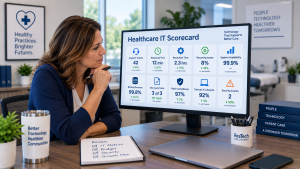
A useful IT scorecard might fit on a single page and show:
| Metric | Current Result | Previous Period | Trend |
| Support tickets | 48 | 52 | Improving |
| Average response time | 12 min | 15 min | Improving |
| Average resolution time | 2.1 hrs | 2.4 hrs | Improving |
| Recurring issues | 8% | 12% | Improving |
| Critical system availability | 99.9% | 99.7% | Improving |
| Backup success | 99.8% | 99.6% | Stable |
| Planned recovery tests completed | 1 of 1 | 1 of 1 | On target |
| Patch compliance | 97% | 94% | Improving |
| Devices within lifecycle | 92% | 94% | Needs attention |
| Security events requiring action | 2 | 3 | Review |
These numbers are examples, not universal targets.
What matters is that leadership can quickly see what is improving, what is stable, and what requires attention.
Example: What the Numbers Reveal for a Houston Medical Practice
Consider a 50-employee Houston medical practice reviewing its quarterly IT scorecard.
Overall ticket volume looks normal, response times are improving, and backups are completing successfully.
However, two numbers stand out.
Recurring issues have increased from 6% to 15%, and the percentage of devices within the approved lifecycle has fallen from 95% to 82%.
A closer review shows that many recurring tickets involve a group of older computers scheduled for replacement.
Those two metrics tell a useful story.
The practice does not simply have a support-ticket problem. It has a technology lifecycle problem that is beginning to create additional support demand.
Leadership can now make a more informed decision about accelerating those replacements.
That is the value of IT metrics. Individual numbers become more useful when they are considered together.
How Often Should Healthcare Leaders Review IT Metrics?
For many small and midsize healthcare practices, a monthly or quarterly review is practical.
Operational measurements such as backup failures, critical security incidents, and major outages should be addressed when they occur rather than waiting for a scheduled meeting.
The broader scorecard can then be reviewed regularly with practice leadership and the managed IT provider.
The discussion should focus on three questions:
- What changed?
- Why did it change?
- Do we need to take action?
Tracking numbers without using them to make decisions provides little value.
Common IT Metrics Mistakes
Healthcare practices should avoid:
- Tracking too many technical measurements
- Reporting numbers without explaining what they mean
- Treating every metric as equally important
- Looking at one month without considering longer-term trends
- Focusing only on support tickets
- Assuming a successful backup automatically means successful recovery
- Reporting thousands of security alerts instead of meaningful incidents
- Setting arbitrary targets without considering the practice's environment
- Collecting metrics without taking action when problems appear
The best IT metrics should help leadership make better decisions, not create more reports to read.
FAQs About Healthcare IT Metrics
How many IT metrics should a healthcare practice track?
For most small and midsize healthcare practices, about 8 to 12 meaningful metrics are enough to provide useful visibility without overwhelming leadership. The 10 measurements in this article provide a practical starting point.
Should healthcare practice leaders review IT metrics every month?
Monthly reviews can be useful for operational metrics, particularly for larger or rapidly changing practices. A formal leadership review may occur monthly or quarterly depending on the organization, while critical failures and security incidents should be addressed immediately.
What is the most important IT metric for a healthcare practice?
There is no single metric that shows whether IT is working effectively. Reliability, support performance, backup and recovery, security, and technology lifecycle measurements should be evaluated together.
Is a 100% backup success rate enough to know our data is protected?
No. Backup monitoring shows whether scheduled jobs are completing, but healthcare practices should also perform test recoveries to verify that critical data can actually be recovered when needed.
Should our managed IT provider give us these numbers?
A managed IT provider should be able to provide meaningful reporting on the technology and services it manages. Some measurements may also depend on information from EHR vendors, internet providers, cloud platforms, or other third parties.
Final Thoughts
Healthcare practice leaders do not need to become IT experts to understand whether their technology is performing well.
Start with 10 numbers:
- Support ticket volume
- Average response time
- Average resolution time
- Recurring IT issues
- Critical system availability
- Backup success rate
- Successful test recoveries
- Security patch compliance
- Devices within their supported lifecycle
- Cybersecurity events requiring action
The individual numbers matter, but the trends and relationships between them matter even more.
A useful IT scorecard should help leadership identify problems earlier, understand where technology investments are needed, and have more productive conversations with the people responsible for managing the practice's technology.
About ResTech Solutions
ResTech Solutions helps healthcare practices throughout the Houston area manage and secure their technology through proactive managed IT services, cybersecurity, Microsoft 365 management, backup and recovery, technology lifecycle planning, and ongoing technology support.
With more than 10 years of experience supporting healthcare practices, ResTech understands that practice leaders need more than technical reports. We help healthcare organizations monitor meaningful technology trends, identify recurring problems, evaluate lifecycle and security priorities, and turn IT information into practical business decisions.
If you're unsure whether your healthcare practice has enough visibility into how its technology is performing, schedule a no-obligation discovery call with ResTech Solutions. We'll review your current IT reporting, answer your questions, and help you identify the metrics that can provide a clearer picture of reliability, security, and technology performance.