August 7, 2026
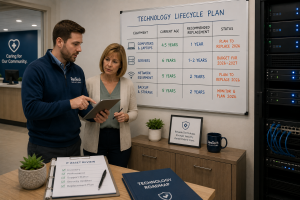 Technology is one of the most significant investments a healthcare practice makes, yet many organizations continue using computers, servers, and network equipment well beyond their recommended lifespan.
While extending the life of hardware may seem like a way to reduce costs, aging technology often results in slower performance, increased downtime, higher maintenance costs, and greater cybersecurity risks.
Rather than replacing equipment only after it fails, healthcare practices should follow a planned technology lifecycle. A proactive replacement strategy helps improve reliability, strengthen security, simplify budgeting, and reduce unexpected disruptions to patient care.
This guide explains how long common technology assets typically last, the warning signs that replacement may be needed, and how to develop a long-term hardware replacement strategy.
Why Technology Replacement Matters
Healthcare organizations depend on reliable technology every day.
Electronic Health Records (EHRs), scheduling software, billing systems, imaging applications, and communication tools all rely on hardware that performs consistently and securely.
As equipment ages, organizations often experience:
- Slower performance
- Increased hardware failures
- Longer support times
- Software compatibility issues
- Higher maintenance costs
- Greater cybersecurity exposure
Replacing technology before it becomes a liability helps reduce these risks.
A 4-Part Technology Lifecycle Framework
Every technology asset has a useful lifespan.
Planning for replacement before equipment fails allows organizations to budget more effectively and avoid unnecessary disruptions.
Part 1: Computers and Laptops
Recommended replacement cycle: Every 4 to 5 years
Desktop computers and laptops typically experience noticeable performance declines after several years of daily use.
Replacement may be appropriate sooner if:
- Devices cannot support current software.
- Performance affects employee productivity.
- Hardware repairs become frequent.
- Operating system support is ending.
- Security requirements exceed hardware capabilities.
Replacing workstations on a predictable schedule also simplifies support and standardization.
Part 2: Servers
Recommended replacement cycle: Every 5 to 7 years
Whether physical or virtual, servers often support your most important business applications.
As servers age, organizations may encounter:
- Storage failures
- Hardware compatibility issues
- Performance bottlenecks
- Warranty expiration
- Increasing maintenance costs
Many healthcare organizations are also moving certain workloads to cloud platforms, reducing the number of on-premises servers they maintain.
Technology planning should consider both hardware replacement and cloud migration opportunities.
Part 3: Network Equipment
Recommended replacement cycle: Every 5 to 7 years
Firewalls, switches, and wireless access points are frequently overlooked because they often continue functioning long after they become outdated.
However, older network equipment may no longer receive:
- Firmware updates
- Security patches
- Manufacturer support
- Performance improvements
- Compatibility with newer technologies
Keeping network infrastructure current improves reliability and strengthens cybersecurity.
Part 4: Build a Long-Term Replacement Plan
Rather than replacing equipment only when it breaks, healthcare practices should maintain a documented replacement schedule.
A technology lifecycle plan typically includes:
- Equipment inventory
- Purchase dates
- Warranty expiration
- Expected replacement year
- Budget estimates
- Business priorities
Planning ahead reduces surprise expenses and allows organizations to spread investments over multiple years.
Signs It's Time to Replace Hardware
Even if equipment hasn't reached its recommended age, replacement may be appropriate when you notice:
- Frequent hardware failures
- Slow startup or application performance
- Unsupported operating systems
- Increasing repair costs
- Limited storage capacity
- Devices that cannot support security updates
- Frequent employee complaints
- End-of-life manufacturer support
Technology that impacts patient care or staff productivity should receive particular attention.
Should You Upgrade or Replace?
Sometimes an upgrade extends the useful life of existing hardware.
Examples include:
- Increasing memory (RAM)
- Replacing traditional hard drives with solid-state drives (SSDs)
- Expanding storage capacity
However, upgrades don't always make financial sense.
If equipment is approaching the end of its expected lifecycle, replacement is often the better long-term investment.
A qualified IT provider can help evaluate which approach provides the greatest value.
Questions to Ask Your IT Provider
When discussing technology planning, consider asking:
Do you maintain a complete hardware inventory?
A current inventory helps support budgeting and long-term planning.
Which devices are approaching end-of-life?
Understanding future replacement needs prevents unexpected surprises.
Are any of our systems no longer supported?
Unsupported hardware and software increase both operational and cybersecurity risks.
Can any existing equipment be upgraded?
Sometimes strategic upgrades can extend useful life while reducing costs.
Do you provide a multi-year replacement plan?
A documented technology roadmap makes budgeting much more predictable.
Frequently Asked Questions
How long should business computers last?
Most business-class computers are replaced every 4 to 5 years, although replacement timing depends on performance, software requirements, and business needs.
How long do servers typically last?
Many organizations plan to replace servers every 5 to 7 years, depending on hardware condition, warranty status, workload demands, and evolving technology strategies.
Should we replace equipment before it fails?
Generally, yes.
Waiting for critical hardware to fail often results in emergency purchases, unexpected downtime, and increased business disruption.
Is cloud technology replacing servers?
Some healthcare organizations are moving portions of their infrastructure to cloud platforms, reducing their reliance on traditional on-premises servers. Others continue using a hybrid approach that combines cloud services with local infrastructure.
Final Thoughts
Technology replacement shouldn't be driven by emergencies.
By following a structured lifecycle strategy, healthcare practices can improve reliability, reduce security risks, simplify budgeting, and provide employees with the tools they need to deliver excellent patient care.
The most successful organizations don't ask, "How long can we keep this computer running?"
Instead, they ask, "When should we replace this technology to support our business most effectively?"
That shift from reactive to proactive planning helps reduce costs over time while creating a more stable and secure technology environment.
About ResTech Solutions
ResTech Solutions helps healthcare organizations throughout the Houston area develop long-term technology lifecycle plans that align hardware investments with operational needs, cybersecurity best practices, and future growth.
From workstation refreshes and server modernization to network infrastructure planning and cloud migration strategies, our team helps healthcare practices make informed technology decisions before aging equipment becomes a business risk.
If you'd like to better understand the health of your current technology environment, schedule a no-obligation discovery call with ResTech Solutions. We'll review your existing hardware, identify systems approaching end-of-life, and help you build a practical replacement strategy that supports your organization for years to come.