Healthcare practices can reduce missed appointments by using technology to remind patients, make confirmations and rescheduling easier, improve communication, and identify scheduling problems before they disrupt the day.
Eight solutions worth evaluating are automated appointment reminders, two-way texting, online scheduling and rescheduling, digital patient intake, patient portals, automated voice reminders, scheduling analytics, and integrated waitlist management.
For an independent medical practice with 10 to 25 employees, the best approach is usually not to purchase eight separate products. It is to identify why patients miss appointments, determine which capabilities already exist in the practice’s EHR or practice management system, and implement the tools that address the most common problems.
The goal is to reduce avoidable scheduling gaps without overwhelming employees, frustrating patients, or introducing unnecessary technology costs.
Why Do Patients Miss Medical Appointments?
Patients miss appointments for different reasons, and technology cannot solve all of them.
Some patients forget their appointment. Others have transportation difficulties, work conflicts, childcare responsibilities, financial concerns, or problems understanding their appointment instructions.
A patient may also attempt to cancel or reschedule but have difficulty reaching the office.
For the Practice Administrator, these situations can create operational challenges:
- Unused appointment slots
- Disruptions to provider schedules
- Additional work contacting patients
- Delays for patients waiting for available appointments
- Reduced predictability in daily operations
- Potential lost revenue when appointments cannot be filled
However, a missed appointment is not always the same as a late cancellation.
A practice should distinguish between patients who do not arrive, patients who cancel with sufficient notice, and patients who cancel too late for the appointment to be filled.
These situations require different solutions.
Before purchasing new technology, review at least 30 to 90 days of scheduling activity, if the practice has enough reliable data to establish a useful baseline.
Identify how many appointments were missed, how many were canceled, and whether particular appointment types or times of day experience more problems.
That information will help determine which technology investments are most likely to be useful.
What 8 Technology Solutions Can Help Healthcare Practices Reduce Missed Appointments?
1. Automated Appointment Reminders
Automated reminders are often a practical starting point because they address one of the simplest reasons patients miss appointments: forgetting.
Depending on the practice’s existing software, reminders may be delivered by text message, email, automated telephone call, or a combination of methods.
The system can send reminders based on configurable schedules rather than requiring employees to contact every patient individually.
For example, a practice might test the following reminder sequence:
| Timing | Purpose |
| 7 days before | Provide advance notice so the patient can identify scheduling conflicts |
| 48 hours before | Request confirmation or encourage rescheduling |
| 24 hours before | Provide a final reminder and approved preparation instructions |
This is an illustrative schedule, not a universal recommendation. The appropriate timing depends on appointment types, patient preferences, and the practice’s operational needs.
A procedure requiring special preparation may need a different communication schedule from a routine follow-up visit.
The practice should also ensure that reminders are sent using the correct patient contact information and approved communication methods.
What to evaluate: Does the existing EHR or practice management system support configurable reminders, and can employees determine whether messages were successfully delivered?
A reminder that never reaches the patient cannot prevent a missed appointment.
2. Two-Way Patient Text Messaging
A reminder becomes more useful when patients can respond.
Two-way texting can allow patients to confirm an appointment, indicate that they need assistance, or request a scheduling change without making a telephone call.
For example, a patient who receives a reminder while working may not be able to call the practice immediately.
If the patient can reply to request a different appointment, the practice has an opportunity to address the conflict before the scheduled visit.
Useful capabilities include:
- Appointment confirmation responses
- Cancellation or rescheduling requests
- Notifications to appropriate employees
- Shared message management
- Conversation assignment
- Patient communication preferences
- Appropriate after-hours responses
- Integration with the scheduling system
The practice must establish what happens when a patient replies.
If a patient sends a cancellation request, does the appointment automatically become available, or must an employee review it?
If the system does not update the scheduling calendar, employees may still need to process the request manually.
The practice should also account for patient privacy and communication preferences. Ordinary SMS messages do not provide the same protections as authenticated secure messaging, and patient replies may contain protected health information.
What to evaluate: Can the platform reliably receive patient responses, notify the appropriate employee, and update the scheduling workflow without creating duplicate work?
3. Online Appointment Scheduling and Rescheduling
Patients sometimes miss appointments because their availability changes and rescheduling is inconvenient.
Online scheduling can reduce that friction by allowing patients to request or manage appointments without waiting for office hours.
However, the software must respect the practice’s scheduling rules.
Important capabilities include:
- Current provider availability
- Appointment-type restrictions
- New-patient and established-patient rules
- Cancellation deadlines
- Rescheduling permissions
- EHR or practice management integration
- Confirmation of completed changes
- Staff approval when required
For example, a patient who learns on Sunday evening that a Tuesday appointment conflicts with work may be able to request a different time immediately.
That gives the practice more opportunity to manage the original appointment slot.
However, not every appointment should be eligible for unrestricted self-service rescheduling.
Procedures, specialized visits, and appointments requiring clinical review may need employee involvement.
What to evaluate: Can patients reschedule appropriate appointments online without creating conflicting or inaccurate calendar entries?
The practice should also verify whether the existing EHR already includes online scheduling capabilities before purchasing a separate platform.
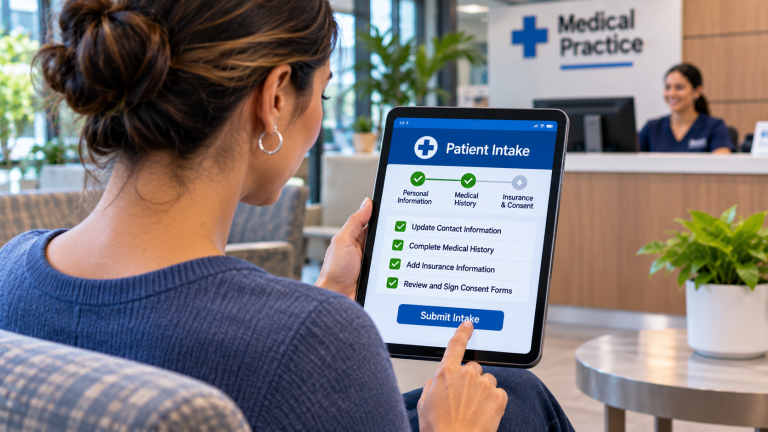
4. Digital Patient Intake and Pre-Appointment Forms
Some patients arrive late or experience appointment difficulties because required paperwork, instructions, or administrative information was not completed in advance.
Digital intake software can help patients prepare before their visit.
Depending on the platform, it may support:
- Demographic information updates
- Medical history questionnaires
- Insurance information collection
- Consent forms
- Appointment-specific instructions
- Secure document submission
- Electronic signatures
- Notifications about incomplete forms
For example, a new patient may receive a secure link several days before an appointment to complete the necessary registration forms.
The practice can then identify missing information before the patient arrives.
Digital intake does not directly solve every cause of missed appointments. Its value is in reducing avoidable administrative obstacles and improving appointment readiness.
The practice should also consider patients who cannot or prefer not to complete forms online.
What to evaluate: Can the platform identify incomplete requirements before the appointment and securely transfer relevant information into the practice’s existing systems?
Employees should not have to manually reenter information that the patient has already submitted electronically.
5. Patient Portal Notifications
Many EHR platforms include patient portals that support appointment information, notifications, secure messages, and other administrative functions.
Before purchasing another communication product, the practice should determine whether its existing portal can support the intended workflow.
Potential capabilities include:
- Upcoming appointment information
- Appointment requests
- Secure messages
- Pre-visit instructions
- Electronic forms
- Appointment-related notifications
- Access to relevant documents
For example, a patient preparing for a follow-up visit may use the portal to review appointment details and complete outstanding requirements.
However, a portal is only useful when patients can access it and understand how to use it.
If patients rarely activate their accounts or do not regularly check portal notifications, the practice may need an additional communication method.
What to evaluate: What appointment-related capabilities already exist in the patient portal, and how frequently do patients use them?
The practice should avoid paying for duplicate functionality unless a separate tool provides a meaningful operational improvement.
6. Automated Voice Reminders
Text messaging is convenient for many patients, but it should not be the practice’s only communication option.
Some patients prefer telephone calls, do not regularly use text messaging, or have accessibility needs that make voice communication more appropriate.
Automated voice reminders can provide another way to reach those patients.
Depending on the system, voice reminders may:
- Announce upcoming appointment details
- Request confirmation
- Provide approved office instructions
- Offer a way to connect with reception
- Record whether the call was answered
- Identify unsuccessful contact attempts
For example, a practice may use text reminders for patients who prefer texting and automated voice reminders for patients who have selected telephone communication.
The practice should avoid excessive or repetitive reminders across multiple channels.
What to evaluate: Can the reminder system respect patient communication preferences and provide useful delivery or response information?
A communication strategy should accommodate patients rather than require everyone to use the same technology.
7. Scheduling Analytics and Missed-Appointment Reporting
Technology can help a practice understand where missed appointments occur and whether its efforts are improving results.
Without reliable reporting, the practice may invest in reminders or other tools without knowing whether they are effective.
Useful measurements include:
| Measurement | What It Helps Identify |
| No-show rate | Percentage of scheduled appointments where patients do not arrive |
| Cancellation rate | How frequently patients cancel appointments |
| Late-cancellation rate | Cancellations that leave insufficient time to refill a slot |
| Confirmation rate | Percentage of patients responding to confirmation requests |
| Reminder delivery rate | Whether messages are reaching patients |
| No-shows by appointment type | Which visit categories experience more missed appointments |
| No-shows by day or time | Whether particular scheduling periods have recurring problems |
| Rescheduling activity | How frequently patients change appointments |
The practice should use consistent definitions.
For example, a useful no-show calculation is:
No-show rate = (No-show appointments ÷ Eligible scheduled appointments) × 100
Suppose a hypothetical practice has 1,000 eligible scheduled appointments during a month, and 60 patients do not arrive without canceling.
Its no-show rate would be:
60 ÷ 1,000 × 100 = 6%
If the following month has 1,000 eligible appointments and 45 no-shows, the rate would be 4.5%.
That represents a reduction of 1.5 percentage points.
These figures are hypothetical and are not presented as healthcare industry benchmarks.
The practice should also establish how canceled appointments, rescheduled visits, and other exceptions are treated in its reporting.
What to evaluate: Can the EHR or practice management system produce consistent reports that show missed appointments and related trends over time?
Reliable baseline data is essential for determining whether changes are working.
8. Automated Waitlist and Appointment-Filling Tools
Even with effective reminders, patients will occasionally cancel.
A waitlist management tool can help the practice offer newly available appointments to patients who want an earlier visit.
Depending on the software, the system may:
- Maintain a list of patients seeking earlier appointments
- Identify patients eligible for an available slot
- Notify appropriate patients
- Allow patients to accept an opening
- Apply appointment-type and provider restrictions
- Update the scheduling calendar
- Remove filled openings from further offers
For example, a patient cancels a Thursday afternoon appointment on Tuesday morning.
Instead of requiring reception to telephone several patients individually, the system may notify eligible patients who have requested earlier availability.
If a patient accepts the opening, the software can update the calendar, provided the necessary integration is supported.
The practice should verify that the platform does not offer the same appointment to multiple patients without appropriate reservation and confirmation controls.
What to evaluate: Can the waitlist tool identify eligible patients and fill canceled appointments without creating scheduling conflicts?
Waitlist automation may not prevent the original cancellation, but it can help reduce the operational impact.
Which Technology Should a Small Healthcare Practice Implement First?
The answer depends on the practice’s existing systems and the primary causes of missed appointments.
A practical approach is to match each operational problem with the technology most likely to address it.
| Primary Problem | Technology to Evaluate First |
| Patients forget appointments | Automated reminders |
| Patients struggle to confirm or cancel | Two-way texting |
| Patients cannot easily change appointments | Online rescheduling |
| Patients arrive without required paperwork | Digital intake |
| Patients need access to appointment instructions | Patient portal capabilities |
| Some patients do not use text messaging | Automated voice reminders |
| The practice does not know why appointments are missed | Scheduling analytics |
| Canceled appointments remain unfilled | Automated waitlist management |
A practice should not assume that more technology automatically means better results.
For example, adding another reminder system may provide little value if the existing system already sends reliable reminders but patients have difficulty rescheduling.
In that situation, improving the rescheduling process may be more useful than sending additional notifications.
Example: How Could a 15-Employee Houston Practice Reduce Missed Appointments?
Consider a hypothetical independent medical practice in Houston with 15 employees.
The practice has two reception employees who handle telephone calls, patient check-in, appointment scheduling, and administrative questions.
The Practice Administrator reviews the previous three months of scheduling data and notices recurring missed appointments and late cancellations.
The practice already uses an EHR with basic appointment reminders, but patients cannot respond directly to those reminders.
Employees also spend time calling patients to fill canceled appointments.
Rather than purchasing an entirely new scheduling system, the practice evaluates three improvements:
- Enable two-way appointment confirmation and cancellation requests through a supported communication platform.
- Introduce an online rescheduling option for eligible appointment types.
- Use an integrated waitlist to notify patients when earlier appointments become available.
The practice tests these workflows for 60 days.
During the evaluation, it tracks missed appointments, cancellations, rescheduling activity, waitlist utilization, and employee time spent processing requests.
The Practice Administrator then compares the results against the previous baseline.
This is a hypothetical scenario, not an actual ResTech client engagement or a prediction of results.
The important lesson is that the practice selects technology based on specific operational problems rather than implementing every available feature.
How Can a Practice Estimate the Financial Impact of Missed Appointments?
Understanding the financial impact can help the Practice Administrator prioritize improvements.
However, the practice should distinguish between the revenue associated with a scheduled appointment and the actual financial impact of a missed visit.
Not every missed appointment results in the same amount of lost revenue. Some may be rescheduled, while others may involve different reimbursement amounts or costs.
Hypothetical Monthly Example
Assume a medical practice has:
- 1,000 eligible scheduled appointments per month
- A 6% no-show rate
- 60 missed appointments
- An illustrative average of $125 in net collections associated with a completed visit
The appointment revenue associated with those missed visits would be:
60 × $125 = $7,500 per month
This is a simplified illustration of potentially affected collections, not a calculation of net profit or guaranteed lost revenue.
Now assume the practice reduces its no-show rate from 6% to 4.5%, with the same number of eligible appointments.
That would represent 15 fewer missed appointments per month.
If all 15 appointments were completed and produced the illustrative $125 in net collections, the associated collections would be:
15 × $125 = $1,875 per month
The actual financial result would depend on whether those appointments were completed, reimbursement, variable costs, patient demand, and other operational factors.
The practice should use its own data when evaluating a potential investment.
What Should a Healthcare Practice Check Before Purchasing New Software?
Before adding a new platform, the Practice Administrator should review the practice’s existing technology environment.
Many EHR and practice management systems already include appointment reminders, portal notifications, scheduling reports, or other useful capabilities.
The first question should be whether those features are available, properly configured, and being used effectively.
A practical evaluation checklist includes:
- Existing capabilities: Determine which reminder, scheduling, messaging, and reporting features are already included.
- Integration requirements: Confirm whether additional software can reliably communicate with the EHR or practice management system.
- Patient privacy: Review how protected health information is handled and what safeguards and agreements are required.
- Communication preferences: Verify that the platform can respect patient preferences and applicable messaging requirements.
- Staff responsibilities: Establish who monitors replies, processes cancellations, and handles exceptions.
- Implementation: Identify configuration, training, and testing responsibilities.
- Total cost: Compare subscription fees, usage charges, integrations, and administrative work.
- Performance measurement: Establish how the practice will determine whether the investment is producing useful results.
A vendor should be able to demonstrate the actual workflow the practice wants to improve.
For example, if the goal is to make cancellations easier, the demonstration should show a patient canceling an appointment, the calendar updating, and the opening becoming available for another eligible patient.
A feature checklist alone does not establish that the workflow will function correctly.
Frequently Asked Questions
Can Appointment Reminders Eliminate No-Shows Completely?
No, reminders can address forgetfulness and help patients identify scheduling conflicts, but they cannot eliminate transportation difficulties, illness, financial barriers, or every other reason for missing an appointment.
A practice should use reminders as one part of a broader scheduling and patient communication strategy.
How Many Appointment Reminders Should a Medical Practice Send?
There is no single reminder schedule that fits every practice.
A practice might test reminders several days before an appointment and again closer to the visit, depending on appointment type and patient preferences.
The goal is to provide useful notice without overwhelming patients with repetitive messages.
Should a Medical Practice Charge Patients for Missed Appointments?
That is a business and policy decision rather than a technology decision.
Before implementing no-show fees, a practice should consider applicable laws, payer agreements, patient communication, consistency, and the circumstances surrounding missed visits.
Technology can help document appointment activity and communicate approved policies, but it does not determine whether a fee is appropriate.
Can AI Help Predict Which Patients Are Likely to Miss Appointments?
Some scheduling and analytics products may offer predictive capabilities that estimate missed-appointment risk.
However, the practice should evaluate the accuracy, transparency, privacy implications, and potential for unfair treatment before using such predictions.
A prediction should not automatically become a reason to deny access to care or impose different scheduling conditions on a patient.
Can a Practice Reduce No-Shows Without Buying New Software?
Yes, the practice may be able to improve results by configuring existing reminder features, updating patient contact information, making cancellation procedures clearer, and reviewing scheduling reports.
Evaluating existing capabilities should generally come before purchasing another platform.
Does the Practice Need an IT Service Provider to Implement These Solutions?
Not every scheduling improvement requires extensive IT involvement.
However, an IT Service Provider can help assess integration requirements, connectivity, cybersecurity, vendor responsibilities, and technical dependencies when new platforms are introduced.
The scheduling software vendor and practice remain responsible for application-specific capabilities and operational decisions.
Final Thoughts
Reducing missed appointments begins with understanding why patients are missing them.
Automated reminders may help patients remember visits, while two-way communication and online rescheduling can make it easier to address conflicts before appointment time. Analytics and waitlist tools can help the practice identify recurring problems and make better use of available openings.
For small healthcare practices, the best technology strategy is usually to improve a few high-impact workflows rather than introduce multiple disconnected systems.
Start with reliable scheduling data, evaluate existing software capabilities, and measure whether each change improves patient communication and daily operations.
About ResTech Solutions
ResTech Solutions helps independent healthcare practices throughout the Greater Houston area manage technology, cybersecurity, Microsoft 365, networks, vendor relationships, and long-term technology planning.
Founded in 2011, ResTech focuses on helping small businesses make informed technology decisions through a security-first, education-focused approach.
When a healthcare practice evaluates appointment reminders, online scheduling, patient communication tools, or other technology intended to improve operations, ResTech can help assess the supporting technology environment, identify integration and connectivity dependencies, review cybersecurity considerations, and clarify responsibilities between vendors.
Our role is to help practices understand the technology requirements and risks involved in their decisions, while software vendors remain responsible for their applications and practice leadership determines which workflows best support patients and employees.
If your healthcare practice is experiencing recurring missed appointments or evaluating technology to improve scheduling, book a 10-minute discovery call to discuss your existing technology environment and the questions worth addressing before making a new investment.
About the Author